
 In collaboration with Atish Mathur
Simple, Structured Mains prep for Smart Aspirants
One page per Mains PYQ: topper answers mapped to it — plus a Learn to Write section for building your own.

Live across GS 1 to 4, the Essay, and eight optionals - PSIR, Sociology, Anthropology, Geography, Law, History, Philosophy and Public Administration.
By continuing, you agree to UPSC Path's Terms of Service and Privacy Policy. You will also receive product and promotional emails, and you can opt out anytime in Settings.

Endorsed by Akansh Dhull, All India Rank 3.
UPSC Civil Services Examination, 2025
Essay Writing Masterclass by Akansh Video includes how to use UPSC Path for Essay paperWhat you get
Think like a topper.
Write like a ranker.
Six features, in the order you will use them: read the answer, learn the structure, find the material, keep what matters.
01Topper Copies
Every topper answer.
One click.
Every Mains PYQ from 2013 to 2025 sits with the similar questions toppers have already answered. Click a question written by a topper and the copy opens on the page where that answer begins, so the hour you would spend hunting a PDF goes into reading and writing instead.
Three clicks, start to answer
Step 1
Click a PYQ
Pick any Mains question from the syllabus tree, by topic, theme or year.
Step 2
See who answered it
The same question, and the similar ones, with every topper who wrote on it listed by rank and year.
Step 3
Read it, then keep it
Land on the page the answer begins, then send any line or region into your Mains notes.
02Learn to Write
Reading toppers is step one.
Learning to write like them is step two.
Every PYQ opens into a writing framework built from real topper answers: ready introductions, body paragraphs, and conclusions you can study and adapt, plus the examples, cross-connections, and keywords toppers used.
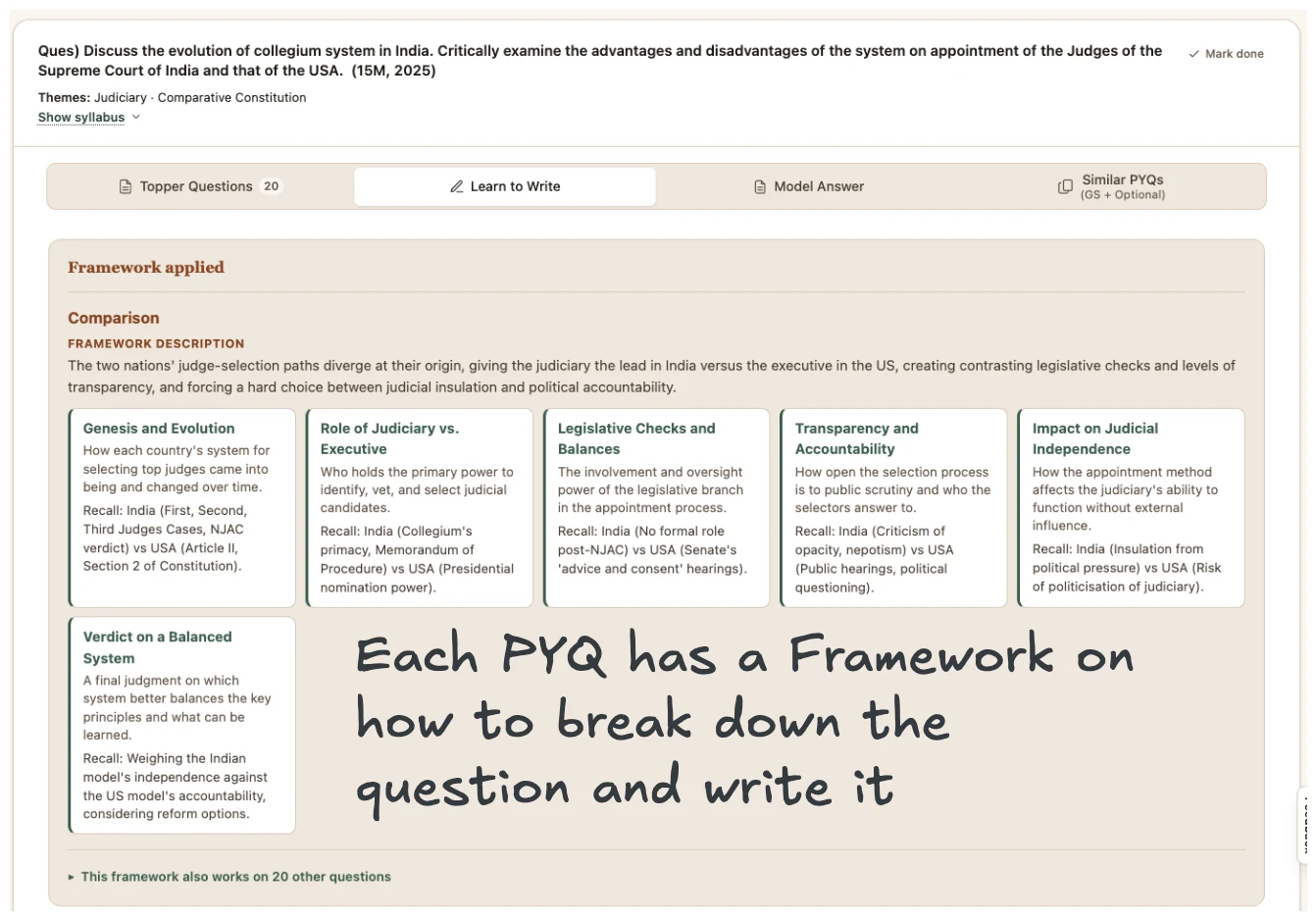
The framework, broken into labelled dimensions.
Introductions
Definition, context, quote and news framings for the PYQ.
Body
Dimensions broken into numbered points with recall examples.
Conclusions
Wayforward and balanced closing lines for the PYQ.
03Search
Find it by thinker, topper, quote, anything.
Stop scrolling 100-page PDFs. Search any topper copy by who wrote it, the thinker they cited, the case study or case law they used, the introduction they opened with.
Every paper carries the filters that actually exist in it:
04Extract
Notes without the bulk.
Highlight any line in a topper copy and pull it out as text. Save a region as a screenshot. Build your notes from the source, not from typing it out yourself, and stop sifting through thousands of pages to find what's worth noting.
Text from scanned copies
Handwritten and printed pages both read cleanly, copy-paste ready.
Region screenshots
Crop once and it lands in your Notes section on UPSC Path, sized for mains-day revision.
05Every morning
The day's papers, read for you.
CA Tracker Pro comes with your UPSC Path subscription, for as long as it runs. The Hindu and Indian Express, cut down to what the exam can ask, ready by 8 am and tagged by subject and topic.
Both papers, sorted before you sit down
Every article tagged by subject and topic, with Must Read for the short mornings.
The clipping, not a summary
The cutting itself sits with every article, with the key takeaways under it.
One set of notebooks
Your notebooks and notes sync between UPSC Path and Tracker Pro, both ways. Save an article in the morning, find it in your notes that night.
The rest of the day-to-day.
06 — 0706 · Syllabus tracker
Track your progress
Mark completion across GS 1–4 and eight optionals: PSIR, Sociology, Anthropology, Geography, Law, History, Philosophy, and Public Administration, so you always know which PYQs still need revision.
07 · My Notes
Keep the ones you flag
Bookmark any question as you browse, then come back to the exact list, no re-searching the syllabus tree to find it again.
More from the house of Atish Mathur.
UPSC Path is built with Atish Mathur. The same house runs the GS II course, the answer-writing sessions and the current-affairs database that sit alongside everything here.
Course · 2026 — Magna Carta Mains Advanced
Magna Carta Mains Advanced
A full-length Mains answer-writing course built and taught by Atish Mathur.
- 12 BAWS every Sunday
- Complimentary MCF I access
- A year of access
Sessions · AIR 3 — BAWS with Akansh Dhull
BAWS with Akansh Dhull
Live answer-writing sessions with AIR 3, one question at a time.
- Live sessions, one question at a time
- A ranker's reasoning spoken out loud
- Pairs with Learn to Write
Tool · Live database — Tracker Pro
Tracker Pro
A live current-affairs database: judgements, amendments, schemes, reports, organisations.
- Judgements, amendments, schemes, reports, organisations
- Real-time updates
- Current affairs there, topper answers here
FAQ
Questions, answered
Plans, copies, answer writing, refunds. The things people ask before they sign up.
Ready to start your UPSC preparation?
Join thousands of aspirants using UPSC Path to prepare smarter.
By continuing, you agree to UPSC Path's Terms of Service and Privacy Policy. You will also receive product and promotional emails, and you can opt out anytime in Settings.